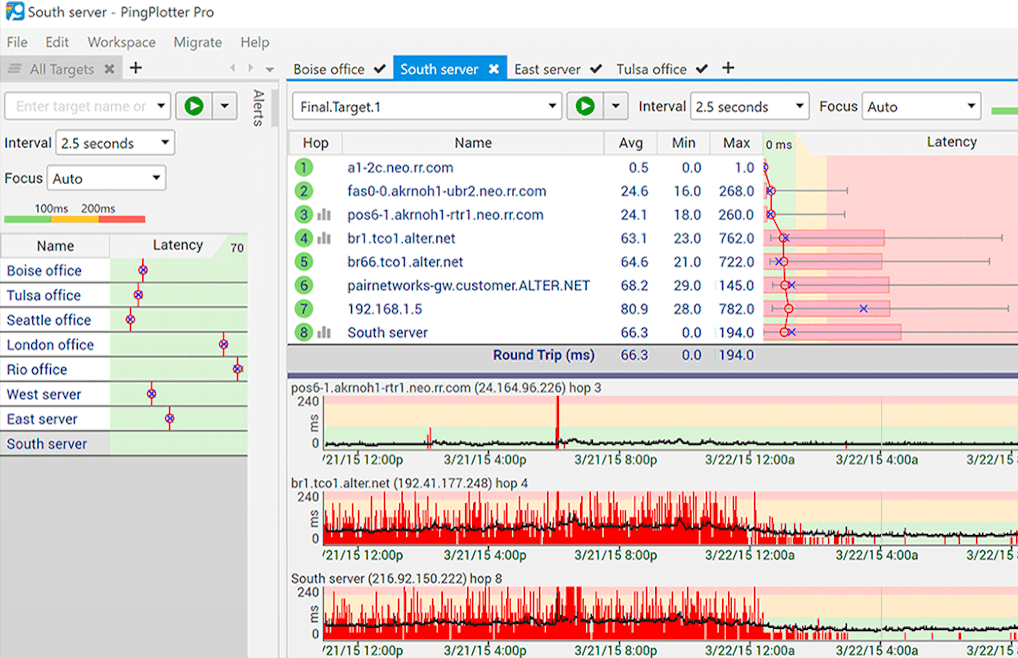
可以即時以圖形方式來顯示您所要監控的網站的連線狀態。
- PingPlotter
- 軟體版本 : 5.25.20 for macOS
- 軟體分類 : 234網路相關 (網路監測)
- 語言介面 : 英文
- 作業系統 : macOS
- 軟體性質 :
- 使用限制 : 十四天試用
- 建議售價 : US:199.95
- 檔案大小 : 21.56 MB
- 官方網站 : Pingman Tools, LLC
- 點閱次數 : 11,998下載次數 : 825
- 更新時間 : 2025/10/7 上午 11:41:54
軟體簡介
網路頻寬障礙排除、診斷工具 - Ping Plotter,可以持續 Ping 一個網域名稱,並列出連線所經節點之 DNS 名稱,透過滑鼠右鍵查詢 WHOIS 網域登記資料;還具有聲音、郵件警報功能,可以在網站頻寬介於預定值時發出警告!
說明介紹
免費版與共享版之功能比較表:
Troubleshooting
Feature Free MultiPing Standard Professional Targets One at a time Hundreds at a time Two at a time Hundreds at a time Metrics Latency, packet loss Latency, packet loss Latency, packet loss Latency, packet loss, jitter Packets ICMP ICMP ICMP, TCP, UDP ICMP, TCP, UDP, remote agent Routes Visualize current route N/A Visualize current route, adjust focus to see route changes Visualize current route, adjust focus to see route changes Protocols IPv4, IPv6 IPv4, IPv6 IPv4, IPv6 IPv4, IPv6 Analysis Focus upper graph Focus upper graph, scale and scroll timelines Focus upper graph, scale and scroll timelines Focus upper graph, scale and scroll timelines Monitoring
Feature Free MultiPing Standard Professional History 10 minutes, graph final hop only Unlimited, graph final hop only Unlimited, graph all hops Unlimited, graph all hops Background collection Runs as native service N/A Runs as native service Runs as native service Management Auto-save collected data Dock and float windows, custom workspaces Auto-save collected data, dock and float windows, custom workspaces Auto-save collected data, dock and float windows, custom workspaces, summary screens, named configurations Remote access N/A N/A N/A Web interface Alert conditions N/A Latency, packet loss, count based Latency, packet loss, time based, count based Latency, packet loss, time based, count based Alert events N/A Log to File, send email, play sound, tray notification, REST call Log to File, send email, play sound, tray notification, REST call Log to File, send email, play sound, tray notification, REST call, modify summary Community
Feature Free MultiPing Standard Professional Share Post to pingplotter.com N/A Post to pingplotter.com Post to pingplotter.com Save Text, PingPlotter files, images N/A Text, PingPlotter files, images Text, PingPlotter files, images Load Files you make N/A Any PingPlotter file Any PingPlotter file Pricing
Volume discounts apply to multi-license purchases.
Feature Free MultiPing Standard Professional Perpetual license No charge ever $39.99 $39.99 $199.95 Subscription N/A N/A $6.99 / license / month $19.99 / license / month Maintenance N/A Start at $9.99 / year Start at $9.99 / year Start at $49.99 / year Purchase Download Free Buy MultiPing Buy Standard Buy Professional
版本說明
x64/x86_64 : 64 位元x32/x86/i386 : 32 位元amd64 : Intel/AMD 64 位元arm64/aarch64 : arm 64 位元安裝版 : 軟體需經過安裝程序才可執行免安裝版/可攜式版 : 軟體不需安裝即可執行
圖片參考
圖片來源 : pingmantools.imgix.net
網編推薦.

多語 Geek Uninstaller Free 1.5.3.170
簡單、快速、易用的軟體反安裝軟體,可以讓我們徹底地移除軟體。
最新焦點

中文 Adobe Acrobat Reader DC 2025.001.21288 繁體中文完整版 for Windows x64
裝機必備軟體,開啟 PDF 檔案全靠它。
網編推薦.

多語 MaxFocus: 連結預覽和AI助手 0.5.8 for Chrome Extensions
MaxFocus 讓您無需離開目前頁面即可產生詳細的連結預覽,從而提升您的 Chrome 瀏覽體驗。此功能可幫助您避免開啟過多標籤頁造成的混亂,從而節省寶貴的系統資源。
在功能上,MaxFocus 提供了閱讀模式,可以將網頁內容呈現在一個乾淨、無干擾的環境中,讓用戶能夠更專心地進行閱讀。同時,視訊模式為用戶提供了一個只有視訊內容,沒有任何多餘元素的觀看體驗。這些模式都是可以根據用戶的個人偏好進行自定義的,包括預覽視窗的大小、持續時間等。
MaxFocus 的 AI 功能是它的另一大特色。透過 AI 輔助,用戶可以直接在頁面上獲得對應內容的摘要或答案,這對於快速擷取資料要點尤其有用。此外,MaxFocus 還支援多種主流瀏覽器,包括 Chrome、Firefox、Edge、Vivaldi 和 Brave,確保了廣泛的相容性和用戶的選擇自由。
在安全性和隱私保護方面,MaxFocus 做出了明確的承諾。它不會追蹤用戶的瀏覽歷史,也不會存儲任何個人資料。此外,它還能夠阻擋網站追蹤器,保護用戶的線上足跡不被第三方追蹤。