相容於 Windows 的資料同步、備份軟體,可透過網路和 FTP 備份或同步到本地或外部硬碟。
- SyncBackSE
- 軟體版本 : 12.0.0.0 for x64
- 軟體分類 : 61工具程式 (檔案同步)
- 語言介面 : 多國語言
- 作業系統 : Windows(含Win11)
- 軟體性質 :
- 使用限制 : 三十天試用
- 建議售價 : US:41.95
- 檔案大小 : 37.92 MB
- 官方網站 : 2BrightSparks
- 點閱次數 : 49,125下載次數 : 2,587
- 更新時間 : 2026/3/31 下午 02:32:30
軟體簡介
SyncBackSE 是一個檔案備份及同步備份程式,它能夠與硬碟,重寫 CD 及 DVD(使用 UDF 格式),可移動媒體(如,快閃記憶體 Compact Flash),FTP 伺服器,ZIP 檔案保存,及網路共用等使用。它非常容易使用,但仍包括很多可選功能給予專業的使用者。 SyncBackSE 是 SyncBack 免費軟體的大大增強版本。新特性包含,可複製已鎖住的檔案,更快的備份,聰明的同步,快速的壓縮,更容易的資料夾及檔案選擇,及一個加強的 FTP 引擎,可支援 SSL 及 Z 模式壓縮。
AI 智慧重點速覽NEW
提供全面的檔案備份、智慧同步及資料復原,確保您的檔案安全無虞。
支援硬碟、隨身碟、FTP伺服器及網路分享等多樣儲存目的地。
操作介面直觀易用,同時整合多項專業級進階功能供進階使用者。
具備複製鎖定檔案、快速備份、聰明同步及高效壓縮等最佳化功能。
透過SyncBack Touch免費支援Windows、macOS、Linux與Android跨系統備份。
說明介紹
SyncBack 系列產品備份、同步和復原資料檔案。
SyncBackPro、SyncBackSE 和 SyncBackFree 在 Windows(11、10、8、7、Vista - 32/64 位)上工作,並被世界各地的個人、小型企業和組織使用。所有三個程式都可以同時安裝,因此您可以評估哪個最適合您。
SyncBackPro 和 SyncBackSE 還允許您使用適用於 Windows、macOS、Linux 和 Android(手機和設備)的SyncBack Touch跨多個作業系統備份資料。SyncBack Touch 完全免費與 SyncBackPro/SE V10 和更新版本一起使用。功能比較表
Licensing and OS Compatibility
Pro V10
SE V10
Free V10
List Price US$57.70 US$41.95 Free License Type Perpetual license for the major version number purchased Freeware Upgrade Assurance available Each license can be installed on up to: 5 devices (home) or
1 device (business)No Limit Supported OS Compatibility Windows 11, 10, 8, 7, Vista
Windows Server 2008 and newer
SyncBack Touch supports: macOS, Android, Linux & Windows
SyncBack Touch is free to use with SyncBackPro/SE V10Windows 11, 10, 8, 7, Vista 64-bit Version Available Supported Protocols
Pro V10 SE V10 Free V10 Types of data backup process supported
New to V10 Can choose files and/or folders to restore in Restore WizardBackup, Fast Backup, Mirror, Intelligent Sync, Restore Backup, Mirror, Basic Sync, Restore Support for internal (local drive) and/or external (USB hard drive, thumbdrive, etc.) storage Backup/sync to/from network PC/device (NAS etc.) FTP protocols supported
New to V10 Expanded FTP/SFTP support, concurrent downloads for large files (Eldos FTP), IPV6FTP / FTPS / SFTP FTP / FTPS FTP VHD/X support SyncBack Monitor support SyncBack Touch support
New to V10 Free to use, Rapid TransferMedia Transfer Protocol (MTP) Cloud Storage Support
Amazon S3™ (and compatible), Backblaze™ B2, Google Storage™, Microsoft Azure™, Microsoft OneDrive™, OneDrive for Business (Office 365), OpenStack, SharePoint™ (Office 365), Dropbox™, Box, SugarSync™, OVH™, hubiC™, Google Photos™, WebDAV and Egnyte™
New to V10 Citrix ShareFile™, pCloud™, S3 object tagging, SSE-C encryption, uses newer Azure API, improved Egnyte performance, reduced memory usage with Box, Google Drive and OneDriveBackup Emails Standard Features
Pro V10 SE V10 Free V10 Ransomware Detection
New to V10 Expanded to also support FTP, SFTP, cloud storage, MTP, VHD, remote file-systems and SyncBack TouchAbort backup if too many changes Central cloud authentication Group profile run
New to V10 Improved performance when more than one profile is running, can automatically abort group profile if a profile failsScheduled Backups Periodic running
New to V10 Can specify which times it can start in and on which days of the weekDifferences window to review proposed changes File Verification Hashing compare method Run external programs before and/or after profiles Multi-language user interface Unicode enabled for multi-language filename support Email Logs
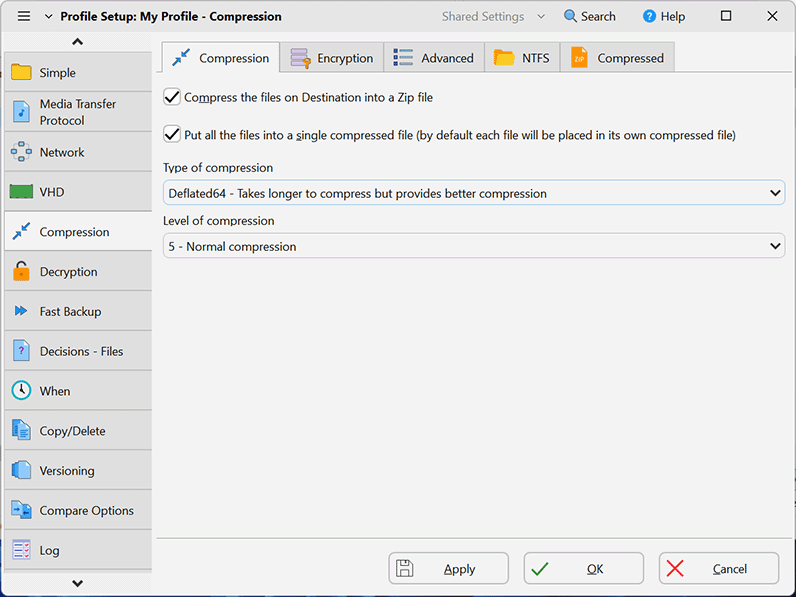
New to V10 Faster log file creationExtensive Help File File Compression Environment Variables Compression Deflate / Deflate64 / BWT / BZip2 / LZMA Deflate / Deflate64 / BWT Deflate Encryption AES 256-bit Basic Zip Encryption Advanced Features
Pro V10 SE V10 Free V10 Delta-copy File Integrity Checking SyncBack Management Service (SBMS) integration
Free with V10Scripting support Automatic drive failure detection
New to V10 Drives tab in Global Settings shows status of all drivesNew to V10 Can require an Internet or specific network connection Smart memory management for large data set backup jobs
New to V10 Can choose to use more or less memoryFaster cloud scanning Faster cloud file transfers New file copying methods Choose settings folder Auto-decrypt NTFS files Faster FTP scanning
Support for CompleteFTP extensionFile Resuming if connection lost Run on Windows startup and/or shutdown/logout Real time Backup/Sync when files/folders change Backup/Sync on device insertion (USB drive, etc) Fast Backup feature (reduces scan times)
New to V10 Fast Backup now can be used with all cloud services (except Backblaze B2 unless used via the S3 compatibility interface), improved optionsIncremental & Differential backups File Versioning Bandwidth throttling (FTP and network) Transfer file and folder ACL security (NTFS/ReFS) New to V10 Transfer file and folder last access date & time (NTFS) Copy symbolic links Pushover notification on profile failure New to V10 Webhook notification when profiles finish Regular Expression (RegEx) filter engine
New to V10 Improved performanceDetect file renames/move Compress email log files Send email logs securely using SSL/TLS connection Move files Automatic profile backups
New to V10 Improved performanceAdvanced Environment Variables
New to V10 Global variables, new variables (e.g. VERSIONSCREATEDTOTAL), auto-incrementing variableCopy open/locked files using VSS List Price US$57.70 US$41.95 Free


版本說明
x64/x86_64 : 64 位元x32/x86/i386 : 32 位元amd64 : Intel/AMD 64 位元arm64/aarch64 : arm 64 位元安裝版 : 軟體需經過安裝程序才可執行免安裝版/可攜式版 : 軟體不需安裝即可執行
圖片參考
圖片來源 : www.2brightsparks.com
復活節嘉年華:VideoProc Converter AI 復活節優惠活動 ,免費領取,並同時贈送多達 21 款實用工具,全部免費!
活動截止日 : 2026/4/5 止
概覽活動主旨:在復活節期間推出免費領取 VideoProc Converter AI Giveaway 版本的活動,同時贈送 20 款實用工具軟體,合計 21 款軟體,幫助用戶完成影像、影音、系統工具等多元任務。
參與對象:全球用戶皆可參與,須符合活動條件與法定成年規定;詳見官方條款。
授權與版本:Giveaway 版本提供基本的 AI 與多媒體處理功能,搭配 20 個免費工具;終身版與購買版在功能與更新權限上存在差異。
取 ● ● ●
網編推薦.

多語 MaxFocus: 連結預覽和AI助手 0.5.8 for Chrome Extensions
MaxFocus 讓您無需離開目前頁面即可產生詳細的連結預覽,從而提升您的 Chrome 瀏覽體驗。此功能可幫助您避免開啟過多標籤頁造成的混亂,從而節省寶貴的系統資源。
在功能上,MaxFocus 提供了閱讀模式,可以將網頁內容呈現在一個乾淨、無干擾的環境中,讓用戶能夠更專心地進行閱讀。同時,視訊模式為用戶提供了一個只有視訊內容,沒有任何多餘元素的觀看體驗。這些模式都是可以根據用戶的個人偏好進行自定義的,包括預覽視窗的大小、持續時間等。
MaxFocus 的 AI 功能是它的另一大特色。透過 AI 輔助,用戶可以直接在頁面上獲得對應內容的摘要或答案,這對於快速擷取資料要點尤其有用。此外,MaxFocus 還支援多種主流瀏覽器,包括 Chrome、Firefox、Edge、Vivaldi 和 Brave,確保了廣泛的相容性和用戶的選擇自由。
在安全性和隱私保護方面,MaxFocus 做出了明確的承諾。它不會追蹤用戶的瀏覽歷史,也不會存儲任何個人資料。此外,它還能夠阻擋網站追蹤器,保護用戶的線上足跡不被第三方追蹤。